The short answer. The best way to name files with dates is to put the date first, in year-month-day order, then a short description. A name like 2026-11-12_Telekom_Invoice.pdf sorts in chronological order in any folder, on any computer, and you can find the file later without opening it.
Why the name matters more than the folder
Folders help when you are browsing. Names help when you are searching. Most of the time, you are searching. You remember that the invoice arrived in November, or that the photos are from a trip in August, and you type a few words into Spotlight. If the file is still called Document (1).pdf or IMG_4582.HEIC, the search has very little to work with.
I keep seeing this when I help people organise their digital life with natrix flow. The folders are not even the main problem. The names are. Once the names are clear, even a slightly messy folder becomes usable.
The simple rule: date first, year first
Use this pattern:
YYYY-MM-DD_What-it-is.ext
So:
2026-11-12_Telekom_Invoice.pdf2026-03-04_Lease_Signed.pdf2026-08-MADEIRAfor a folder of trip photos2026-11-16_Q4_Budget_v2.xlsx
The date goes at the start, not the end, so the files line up in time when you sort by name. The year goes first, then the month, then the day. That is the international date format, sometimes called ISO 8601, and it has a practical benefit: 2026-11-16 sorts after 2026-03-04, which 16-11-2026 and 11-16-2026 will not do reliably.
It also removes a common mix-up. In some countries 03/04/06 is 3 April. In others it is 4 March. Year-month-day does not have that problem.
If you only know the month, 2026-08_Summer_Schedule.pdf is still useful. If you only know the year, start with 2026_. Something is better than nothing.
What to put after the date
Add just enough that your future self can tell the file apart from the others.
A good set of ingredients is:
- Who it is from or for, such as Telekom, a client name, or your landlord.
- What it is: Invoice, Contract, Receipt, Photo, Notes.
- A version, if you really need one, such as
v2orsigned.
You do not need all of these every time. 2026-11-12_Telekom_Invoice.pdf is enough for a bill. A very long file name is harder to read in Finder, and some tools still get unhappy with names that run on and on.
Skip words like “document”, “file”, “new” and “final final”. They do not help you search, and “final” has a way of stopping being final.
Characters that keep names friendly
Stick to letters, numbers, hyphens and underscores. A few practical rules:
- Use an underscore or a hyphen between the parts, and stay consistent. I use underscores between the big parts, and hyphens inside a phrase if I need them.
- Avoid characters that folders and cloud drives sometimes treat as special:
/ \ : * ? " < > |, and names that start with a dot. - Spaces usually work on a Mac, but they can be a nuisance when you send a file, zip it, or use the name in a script. Underscores travel better.
- Do not use a slash in the date.
2026/11/12looks like a folder path. - If you number files, pad the numbers:
001,002,010, so 10 does not appear before 2.
The name should still make sense if the file is taken out of its folder and sent to someone else. That is why the date and the subject live in the name, not only in the folder title.
A few everyday examples
Paperwork. 2026-11-12_Telekom_Invoice.pdf, 2026-01-20_Health_Insurance_Policy.pdf. When the same bill arrives every month, the date at the front keeps the set in order.
Photos and trips. A folder called 2026-08-MADEIRA is easier to find than Vacation 2 or a camera roll of IMG_ names. You can leave the original photo names inside if you like, and let the folder carry the date and place.
Work in progress. 2026-11-16_Proposal_v2.docx is clearer than Proposal-final-FINAL.docx. Put the version at the end, so the date and the subject stay at the front.
Downloads you plan to keep. Rename them as you file them, not later. Later rarely comes.
How to rename files you already have on a Mac
You do not have to do them one by one.
For a single file, select it in Finder and press Return, then type the new name and press Return again.
For a batch:
- Select the files in Finder.
- Control-click and choose Rename, or go to File > Rename.
- You can replace text (for example, change
IMG_to2026-08-Madeira_), add text at the start or end, or apply a format with a name, a number and a date.
Finder’s date in that format uses the file’s date, which may be the date it was downloaded, not the date on the invoice. For paperwork, I still type the date from the document when it matters. For photos, the file date is often close enough, or you can use the date in the photo’s information.
Do a small batch first, then check the result before you rename hundreds. And if a file is already named well, leave it.
If you have leftover names like (1) or final final, this is the moment to clean them up. Keep the real copy, give it a proper name, and put true duplicates in a separate folder until you are sure.
A convention only works if you keep it
The rule is simple. The hard part is using it on a Tuesday, when you just want to save the file and get back to work.
Two things help. One is a weekly glance at Downloads and the Desktop, where badly named files tend to land. The other is to rename at the moment you decide to keep something, not in a rainy-day tidy that never happens.
If you want a deeper cleanup of the folders themselves, I have guides on how to organize your Downloads folder on a Mac and how to clean up a messy Mac desktop.
A faster way, if you want one
You can follow this convention by hand, and it will serve you well.
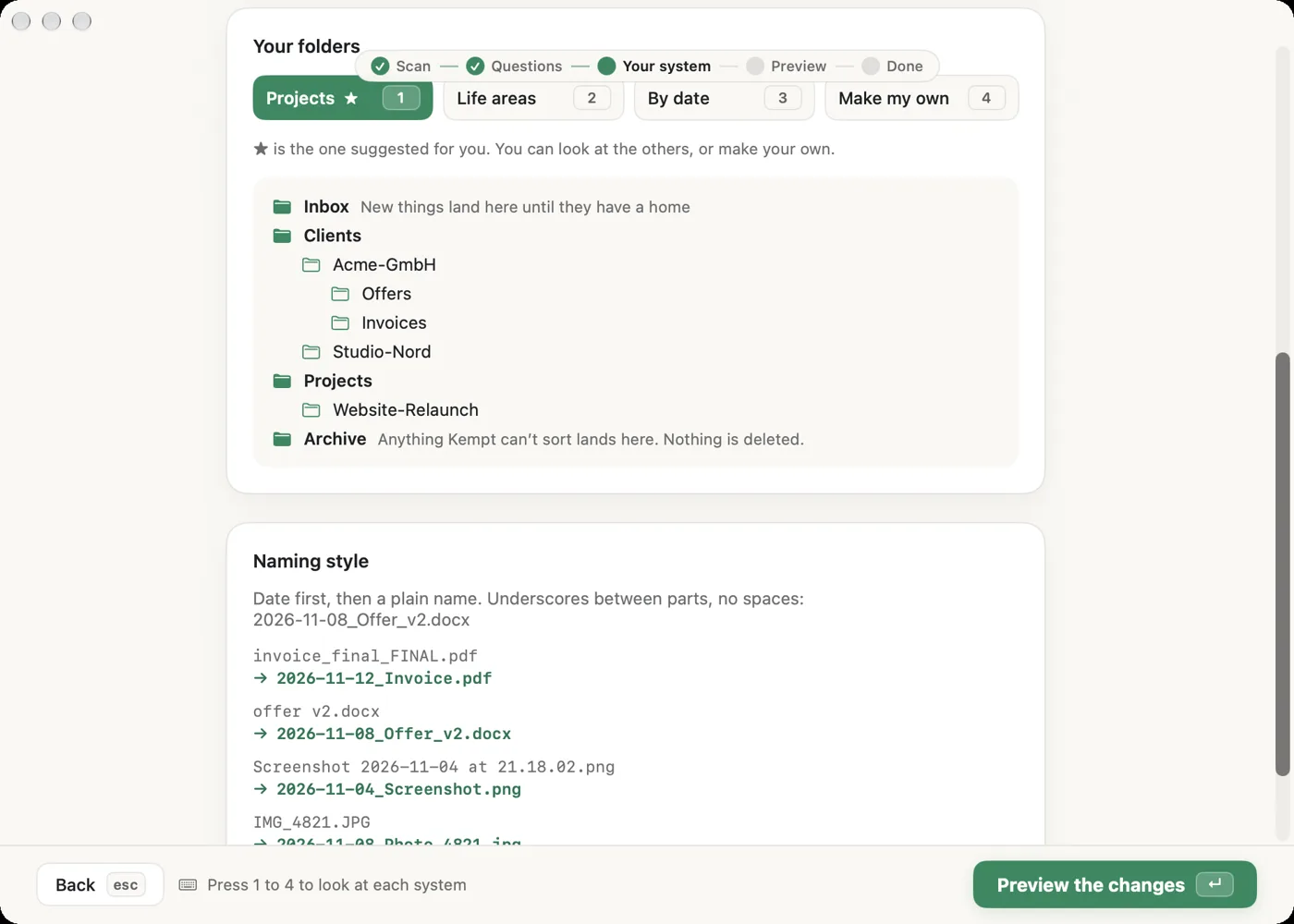
I also built it into Arrayo, a Mac app I made to tidy a messy folder. After a scan and a few questions, it suggests a folder system and date-first names, such as 2026-11-12_Telekom_Invoice.pdf or a photo folder like 2026-08-MADEIRA. It cleans up copy leftovers like “(1)” and “final final”, and it shows you a preview before anything changes. It never deletes, and you can undo.
The free beta covers the scan, the questions and one folder. You can ask for beta access here. It works offline, with no cloud AI, on macOS 14 or later.
Try this on your own folder
The steps above work on their own. If you would like a calmer way to do the first tidy, the free Arrayo beta can scan a folder, ask a few questions, and tidy one folder. You see a preview first. It never deletes, and you can always undo.